Preview before saving
Choose Article, Selection, or Full page. Inspect the preview, then edit supported properties and tags before saving to a Notion page or database.

Proofclip / A personal project by Braňo
A free, open-source Chrome extension. Preview your clip, choose a destination, and check the saved blocks without leaving the popup.
You need your own Notion integration token. See setup instructions
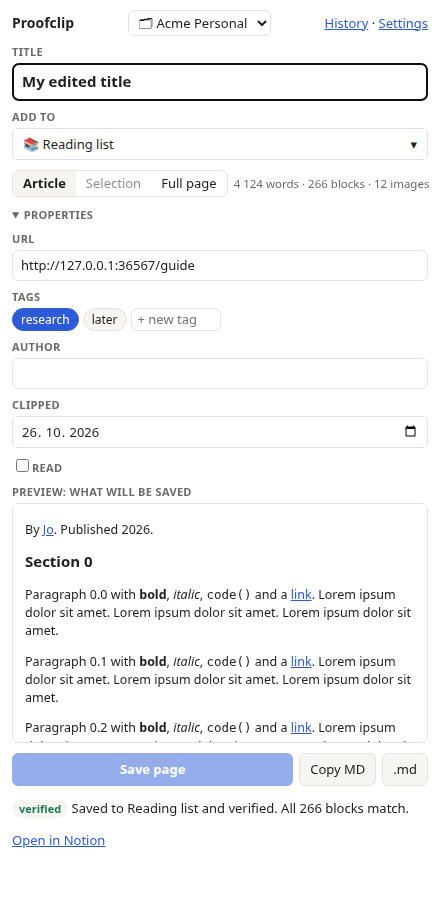
Choose Article, Selection, or Full page. Inspect the preview, then edit supported properties and tags before saving to a Notion page or database.
Proofclip reads the saved blocks back from Notion. It compares block types and text, including nested blocks, with whitespace normalization.
Failed saves stay in History for retries. Copy or download Markdown, export JSON backups, and connect multiple workspaces.
What verification covers: block types and text. It does not compare all formatting or links, or confirm that external images remain available.
Connect your workspace
This release uses an integration token. One-click Sign in with Notion is not configured in the distributed extension.
Keep your token private. Never include it in a public issue or screenshot.
Clips and connection details, including your token, stay in your browser’s local extension storage. They do not use Chrome Sync.
Content is sent directly to Notion when you save or retry. Proofclip also contacts Notion to connect workspaces and find destinations. Preview images can load from their source websites.
Proofclip has no analytics or ads. The maintainer does not receive your clips or token.
Read the privacy policyProofclip is an independent project and is not affiliated with Notion.